


MyQuest for Patients
4.517.56K Reviews
App Specs
- Version
- 5.9
- Updated On
- License
- Free
- Downloads
- 1,000,000+
- Developer
- Quest Diagnostics Incorporated
- Categories
- Medical
- Platform
- Android, iOS
Screenshots
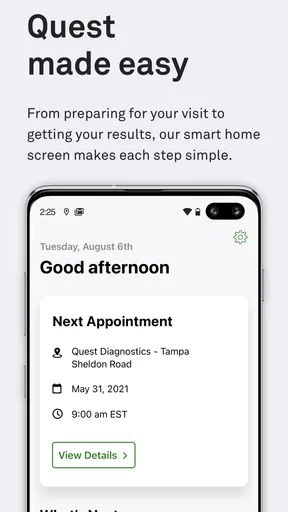
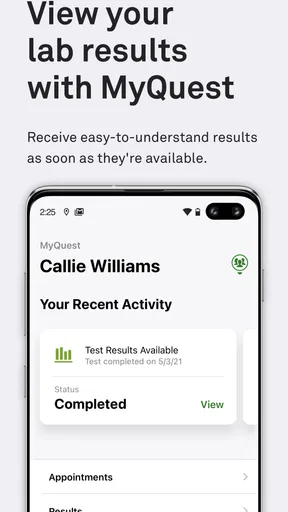
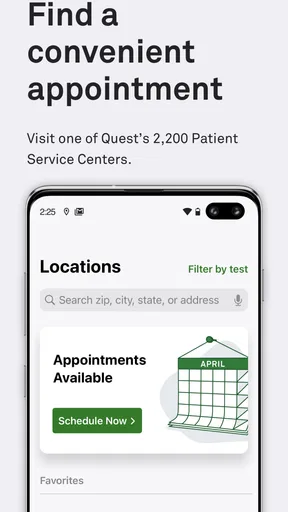
 Analysis by AppCompare
I’d decide whether this app fits by asking one practical question: do I want a convenient way to keep track of lab information connected with Quest Diagnostics, or do I need a broader health record that brings together care from many providers? That distinction matters more than a long feature list. MyQuest for Patients is a medical app from Quest Diagnostics Incorporated, and its main appeal is having relevant lab information available on a phone instead of relying only on paper or trying to remember where a result was filed.
For someone who gets tests through Quest and wants to check results at home, that focused purpose can be useful. I’d be less likely to choose it as my only health-management tool if I wanted a complete picture that includes records from unrelated clinics, appointments, medications, or other services. It makes most sense as a practical companion to lab testing, not as a replacement for a clinician or a universal medical record.
What I would consider before installing
The app is free, rated for Everyone, and has an average rating of 4.4 from around 43,000 ratings. Those figures suggest it has found a substantial audience, but ratings alone can’t tell me whether it matches my needs. I’d first consider whether I use Quest Diagnostics, whether checking results on a phone would save me time, and whether I’m comfortable managing health information through an account and an app.
It has been available since March 27, 2014, and version 5.5 requires Android 6.0 or later. It has over a million installs. I’d still check that my phone’s software is compatible before planning to rely on it, especially if I use an older device. Those details make it easier to judge basic fit, but the more important question is whether Quest is part of my own care routine.
Your Health, Simplified
So, what's the deal with MyQuest for Patients? At its core, this app is all about giving you easy access to your health information. It's like having a personal health assistant in your pocket, minus the white coat. From viewing your lab results to tracking your health trends over time, the app turns a potentially overwhelming experience into something manageable.
Upon diving into the app, I found the interface to be straightforward and user-friendly. No frills, just the important stuff. You can quickly navigate to your results and even see a breakdown of what everything means. Fancy terms are defined, so you're not left scratching your head. It's designed with the patient in mind, making sure you're not lost in a sea of medical jargon.
Features that Matter
One of the standout features is the ability to view your results history. This is perfect for those of us who like to keep tabs on any changes over time. The app also provides you with a graphing tool, which visually represents your data. Pretty nifty, right?
Worth Reading Before You Choose

EA SPORTS FC Mobile 26 Is a Bigger Football Game, but It Takes Time

Flipboard Shows What News Apps Must Do Beyond the Feed

Switching to Android Auto Means Rethinking Your Driving Routine

Google Calendar Makes a Crowded Week Easier to Manage

Ludo King Makes the Most of the Minutes Between Plans

Baby Panda World Brings Quick Play to Modern Phones, but Its Game Library Feels Busy
The history and graph are most useful when I treat them as preparation for a conversation, not a diagnosis. A trend can help me explain what I’ve noticed to a clinician, but a chart by itself can’t account for why a result changed or what it means for my health. A sensible workflow is to note the result that raised a question, compare it with earlier entries when available, and bring that question to the professional who ordered the test.
Another cool aspect is the alerts feature. The app will notify you when your results are ready, so you’re not constantly checking your email or mailbox. Plus, there's a section for educational resources, helping you understand more about your health conditions and what those results mean in the grand scheme of things.
In everyday use, a notification can be a prompt to sign in and review information when I have time, rather than a reason to interpret a result in a hurry. If I’m waiting for a particular test, alerts may reduce the temptation to keep checking repeatedly. I’d still make sure I know how to reach the ordering clinician, since learning that a result is available and getting personal medical guidance are separate steps.
Easy Access, Anytime
Logging in is a breeze. You can use your existing Quest Diagnostics account or create a new one. Once you're in, all your relevant medical data is at your fingertips. No more digging through piles of paper to find that one elusive result. Everything is neat and organized, just how I like it!
A realistic example is getting a test before a follow-up appointment. I could check the app when the result is ready, review the information at home, and make a short list of questions instead of trying to absorb everything in the examination room. If I’m helping a family member, I’d be careful to keep account access and private health details under that person’s control; convenience is not a reason to share a login casually.
"It's like having a personal health assistant in your pocket, minus the white coat."
Security is always a concern when it comes to health information, and the app doesn’t skimp in this department. Your data is secured with top-notch encryption, so you can rest easy knowing your personal information is safe.
Because this is sensitive information, I’d use a phone lock and avoid leaving the app open on a shared device. I’d also check that I’m signing in to my own account before reviewing results, particularly if I help someone else manage appointments or paperwork. Those habits are useful whichever patient app I use; the convenience of a screen should not make me less careful with private details.
Where another approach may fit better
Compared with paper reports, an app can make it easier to revisit past results and keep information close at hand. Compared with a general health-record app or a provider’s patient portal, MyQuest has a narrower role: it is most relevant when Quest Diagnostics is part of the testing process. If my care is spread across several organizations, I may still need those providers’ own portals or a separate method for collecting records. I wouldn’t assume that one app automatically contains every part of my medical history.
That trade-off is the key reason some people may prefer an alternative. Someone who rarely uses Quest, prefers paper, or needs a combined view of care from different providers may get less value here. A portal tied to the clinician managing a condition may be a better place for questions about treatment and follow-up, while a personal record-keeping method can help gather documents from multiple sources. The best option depends on where the tests and care actually happen.
Small habits that make it more useful
I’d make a quick note of the test date and the question I want to ask before opening a result, especially if I’m comparing it with an earlier one. That keeps me focused on the reason the test was ordered rather than reading every number as a verdict. If I notice a change, I’d record what I want clarified and bring it to the appropriate clinician instead of trying to infer a diagnosis from a graph.
It is also worth thinking through the login before a time-sensitive test: make sure the account is accessible and that you can get into it on the phone you plan to use. If a notification doesn’t appear, I wouldn’t treat that alone as proof that no result is ready; I’d sign in and check directly when appropriate. These are simple habits, but they help prevent an app from becoming a source of avoidable worry.
Who benefits—and who can skip it
I’d recommend considering this app if you use Quest Diagnostics and want a more organized way to look back at lab information between appointments. It may be especially helpful for someone who has recurring tests and wants to compare results over time, or for a person who prefers to prepare questions before speaking with a clinician. Its medical focus and plain-language explanations make it approachable for people who don’t feel comfortable interpreting a page of lab terminology alone.
I’d skip it if I don’t use Quest or if I expect it to replace the advice of a healthcare professional. It may also be the wrong primary choice for someone who needs one place for records from many unrelated providers. In that case, I’d use the relevant provider portals or another record-keeping approach alongside it, rather than expecting this app to cover a broader job than its focused purpose.
For a first-time user, the practical questions are straightforward: can I use an existing Quest account, and how do I get started? The app supports signing in with an existing Quest Diagnostics account or creating a new one. What should I do with a result I don’t understand? Use the educational material as context, then ask the clinician responsible for the test; an app can make information easier to review, but it cannot personalize medical advice. And if I want records from care outside Quest, I should plan to access those through the relevant provider or another method rather than assume they will appear here.
Switching from paper to a phone-based routine is a small change, but I’d keep any records I already rely on until I’m comfortable finding what I need in the app. That way, I’m not caught unprepared for an appointment while changing habits. If I later stop using the app, I’d also think about how I prefer to keep track of useful information and where I can retrieve it, instead of assuming that an app should be my only record.
The Bottom Line
In the end, MyQuest for Patients is a must-have for anyone looking to take control of their health data. It's intuitive, informative, and makes understanding your health a whole lot easier. Whether you're tech-savvy or just dipping your toes into the digital world, this app is a fantastic tool for managing your health. So, if you haven't already, give it a whirl and see how it can simplify your healthcare journey. You won't regret it!
My own recommendation is a little more specific: I’d try it if Quest Diagnostics is already part of my testing routine and I want easier access to lab information. I would not choose it as a universal health hub, and I would not rely on charts or definitions in place of a clinician’s interpretation. Used for the focused job it suits, it can make the wait between testing and a medical conversation feel more organized; if that is the gap I want to close, it is worth considering.
Pros
- User-friendly interface for easy navigation.
- Secure messaging with healthcare providers.
- Access to detailed medical history at any time.
- Appointment scheduling and reminders integrated.
- Supports multiple language options for accessibility.
Cons
- Limited integration with certain healthcare systems.
- Notifications can be overwhelming at times.
- Occasional syncing issues with wearable devices.
- Requires a stable internet connection to function.
- Some features locked behind a subscription.
FAQs for MyQuest for Patients
What is MyQuest for Patients and what can I do with it?
MyQuest for Patients is a mobile application designed to give users access to their lab results, manage appointments, and receive health insights directly from Quest Diagnostics. With this app, you can view and share your lab results securely, schedule appointments for lab tests, and track your health over time with personalized insights.
How do I sign up and access my lab results on MyQuest for Patients?
To sign up, download the app from the App Store or Google Play, and create an account using your email. You’ll need to verify your identity, which may involve providing some personal details. Once registered, you can access your lab results by logging into the app, where results will appear after being processed by Quest Diagnostics.
Is MyQuest for Patients secure and how is my data protected?
Yes, MyQuest for Patients prioritizes your privacy and security. The app uses advanced encryption and security measures to protect your data. It complies with HIPAA regulations, ensuring that all personal and health information is securely stored and accessible only to you and authorized personnel.
Can I use MyQuest for Patients to schedule appointments, and how does that process work?
Absolutely, you can schedule appointments for lab tests directly through the app. Simply log in, navigate to the appointments section, and select your preferred location, date, and time. The app provides a seamless scheduling experience, ensuring you get the necessary tests at your convenience.
What devices and operating systems are compatible with MyQuest for Patients?
MyQuest for Patients is compatible with both Android and iOS devices. For optimal performance, ensure your device is running the latest operating system: Android 6.0 (Marshmallow) or later, and iOS 11.0 or later. Regular updates to the app also help maintain compatibility and security.


